.svg)
If you are using FTLinx, and are getting a "No Valid License" issue in the logs, it is likely a problem with licensing the Logix Designer SDK. Here are some things to check:
- You will need to be using Logix Designer SDK v2.01 or later
- Downloadable from Rockwell, or included with Studio 5000 Professional (or Service Edition) v35 or later
- If the license is already activated under a lower entitlement version, re-host the license and reactivate it, selecting entitlement 35.00.01 during activation.
- You will require Studio 5000 v31 Professional (or Service Edition) or later
- Your Studio 5000 should be under support with Rockwell
- If not, then after renewing support, you will be able to rehost the license and activate it again, making sure to select the corresponding current version in order to successfully activate it as CodeMeter.
- To activate the SDK feature, the license must be activated as CodeMeter. (not Flexera)
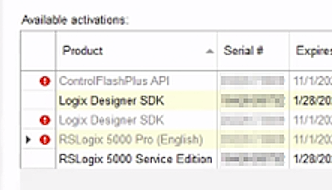
- You should see the SDK Line items in your activation server, similar to the below:
- Install the required .NET 8 x86 Runtime as administrator using the link provided in the error output: https://aka.ms/dotnet-core-applaunch?missing_runtime=true&arch=x86&rid=win-x86&os=win10&apphost_version=8.0.6