.svg)
Users may encounter a “Server Busy – action cannot be completed because another program is busy” dialog when launching or using RSLogix Micro / RSLogix 500. This typically indicates that a dependent component (most commonly RSLinx or related services) is not responding or is blocked.
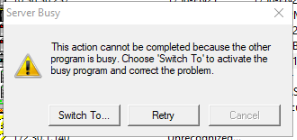
This is referenced in Rockwell KB: https://support.rockwellautomation.com/app/answers/answer_view/a_id/49986/
In addition, a list of user resolutions can be found online to assist with this issue, including:
- Click Retry once, wait several minutes (up to ~5 minutes), then retry again.
- Allow RSLinx to finish background activity before attempting to go online.
- Click “Switch To” once, then return to RSLogix and try again.
- Ensure RSLogix sessions are closed cleanly; reboot the PC if the issue persists.
- Disable RSLinx AutoBrowse to prevent continuous background browsing.
- Back up and reset RSLinx configuration using the Backup/Restore utility.
- For persistent issues, reset RSLogix settings or clear Harmony files (advanced troubleshooting).